MIR4 Ant Hole 2F Map
Pick an area to open its map, or work the Secret Peak board: toggle resource overlays, mark what you have cleared and run respawn timers for every account you play.
Ant Hole 2F
Phantasia Area · Ores, Plants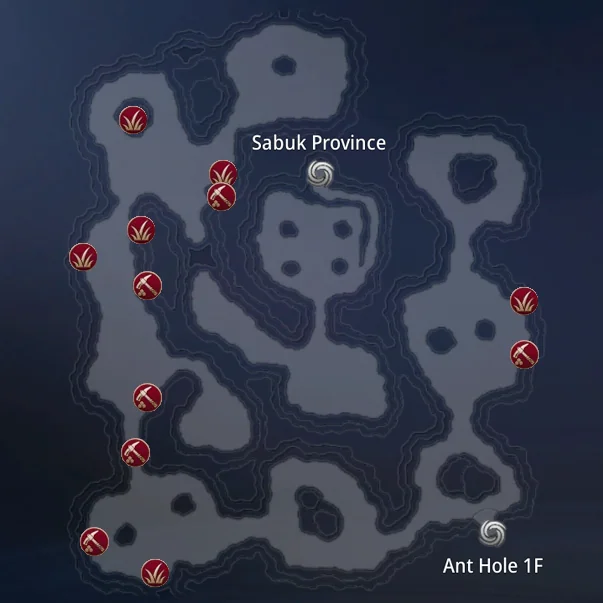
Snowfield Area
1Phantasia Area
9Phantasia Area Chests
12Spiritual Center Area
8What you need to know
Everything you will need while you work the Maps page is here. Boss timers, when the alarm goes off, how accounts stay separate and where your marks are kept, all written out. If something is missing, tell us on Discord and we will add it.
Ask on DiscordAt Secret Peak, 4 bosses respawn in 30 minutes and 2 in 60
Click a boss icon on the map and the timer starts, the time left shows on top of the icon, and if you started it by mistake you click it again to cancel. The 4 bosses marked green respawn in 30 minutes, the 2 marked orange in 60. The countdown runs off the real clock, so it stays accurate even if your computer sleeps or the tab sits in the background.
The Legendary ore has its own button
A Legendary ore comes back one hour after it is mined, somewhere else on Secret Peak, so it has no fixed spot. That is why it is not an icon on the map but a button of its own above it. Its timer counts down from 60 minutes.
The alarm rings once per timer
You choose whether the sound plays right at the spawn or 30 seconds, 1 minute or 5 minutes before it. The alarm fires once for a timer, it does not keep going off the whole time. Volume sits in the same menu, and the test button lets you try it before you settle on a level. The page has to stay open for the sound to come through.
The alarm watches every account, not just the open one
Timers are kept per account, but the alarm follows all of them at once. A boss timer you started on account 2 still rings when its time comes, even if you have already switched to account 1. So you are not hopping between account tabs just to check on timers.
Every account gets its own map, marks and timers
The page opens with 3 accounts, and you can add a new one, rename it or delete it. When you switch tabs, the open map, the marks, the boss timers, the Secret Peak floor and the active overlays all change together. So when you play 2 characters at the same time, their records never get mixed up.
Everything stays in your browser
This page needs no membership and no login, and your accounts never reach a server, they sit in your browser's own storage. The trade off is simple. Those same records will not show up on another device or in a private tab, and if you clear your browser data they are gone.
Marks stay where you put them
Left click on the map drops a turquoise mark, right click a red one, and clicking a mark removes it. On a phone you tap to place a mark and pick its colour next to A tap places. Marks keep their spot when you resize the window or turn your phone sideways.
Secret Peak overlays change with the floor you pick
There are 7 overlays: Darksteel, Energy, Ores, Plants, Chests, Goblin Guard and Goblin Hunter, and you can stack all of them at once. 1F/6F and 7F/8F are 2 different maps, so the same overlay points at different spots on each one. Pick an overlay or a floor and the page takes you straight back to Secret Peak.
The catalog holds 41 area maps
They are grouped under 6 headings: Snowfield Area, Valley Floors, Phantasia Area, Phantasia Area Chests, Spiritual Center Area and Common / Elite. Each map tells you what is drawn on it, like ores, plants, chests or bosses. Every map also has its own link, so you can send one straight to your clan.